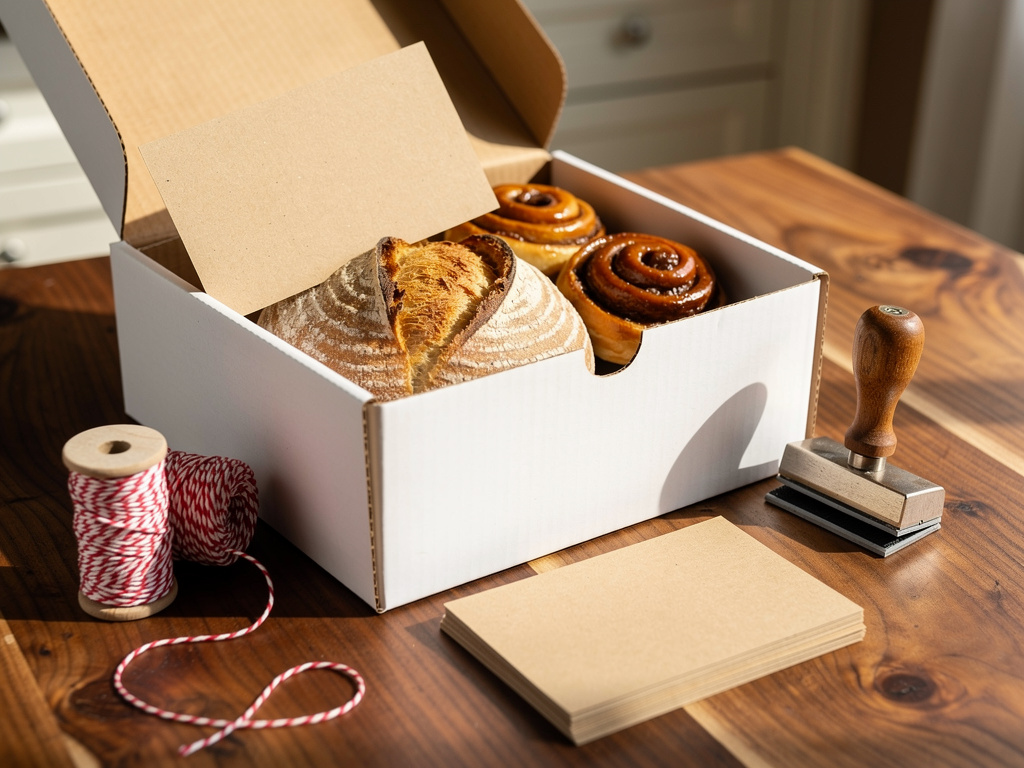


The short version: A good bakery business card tells someone what you bake, how to order, and where they pick up, with a scannable code linked to your order page. For a home baker, the most useful ideas are a card tucked into every box, a short menu or a punch card printed on the back, and a separate card for custom cakes that opens your cake listing. Keep the QR code at least 1 inch square, print a pickup area instead of your home address, and never print "gluten-free" or "nut-free" unless you can prove it. Printing is cheap: Vistaprint listed 100 standard cards with a blank back at $14.99, or $0.15 each ($21.99 with a full-color back), and MOO listed 100 thicker two-sided cards at $45.00.
Checked on Vistaprint's and MOO's business card pages, September 27, 2026: prices are before tax, and Vistaprint's standard delivery was $5.99 on top. The Homegrown, Hotplate and Square fees below come from their own pricing pages the same day. Homegrown customers create an account to place their first order, and Homegrown does not design or print cards.
Search for bakery business card ideas and you get template galleries: pink cupcakes, gold foil, a whisk crossed with a rolling pin. On September 27, 2026, 7 of the 9 page-one results we checked were templates or product pages. They show you how a card can look. None of the 9 was written for a home baker, and none walks through what the card has to do once it leaves your hands.
That job is simple. A customer opens your box at home, eats the cinnamon roll, and wants more next week. Often the card in the box is the only thing that tells them how. This guide covers what to print on a bakery business card, the design and back-of-card ideas that bring orders, what size and paper to pick, what printing costs today, which words need proof, and where the QR code should send people.
A bakery business card needs seven things, and a home baker can skip everything else. Every line should help someone order from you again without having to message you first. If you are still setting up, the complete guide to starting a home bakery covers permits, pricing and your first menu before you print anything.
That is it. A card with 12 lines of contact details and a tagline reads like a real estate agent's card. A card with seven clear lines reads like a bakery people can order from.
The one line most home bakers forget is lead time. If your card says nothing about notice, someone will text you on Friday night for a birthday cake on Saturday. Printing "2 weeks' notice for custom cakes" answers that question before anyone asks it.
The best bakery business card designs borrow from what you already hand people: your box, your sticker, your ribbon and your best-selling bake. A card that matches your packaging tells the customer it came from you, even when it sits on a counter for a month. Here are nine design ideas that work for a home baker:
Pick two of these at most. A kraft card with a stamp and a photo of your bagels is a strong design. Add foil, a die cut and an illustration, and the card starts to look like a template gallery instead of your kitchen.
The back of a bakery business card is free space for the one thing that brings the next order, so use it for a menu, a punch card, or your pickup schedule. MOO prints both sides of its Original cards at no extra cost, while Vistaprint's standard price covers the front only, with double-sided printing as an upgrade. Here are the backs that work hardest for a home baker:
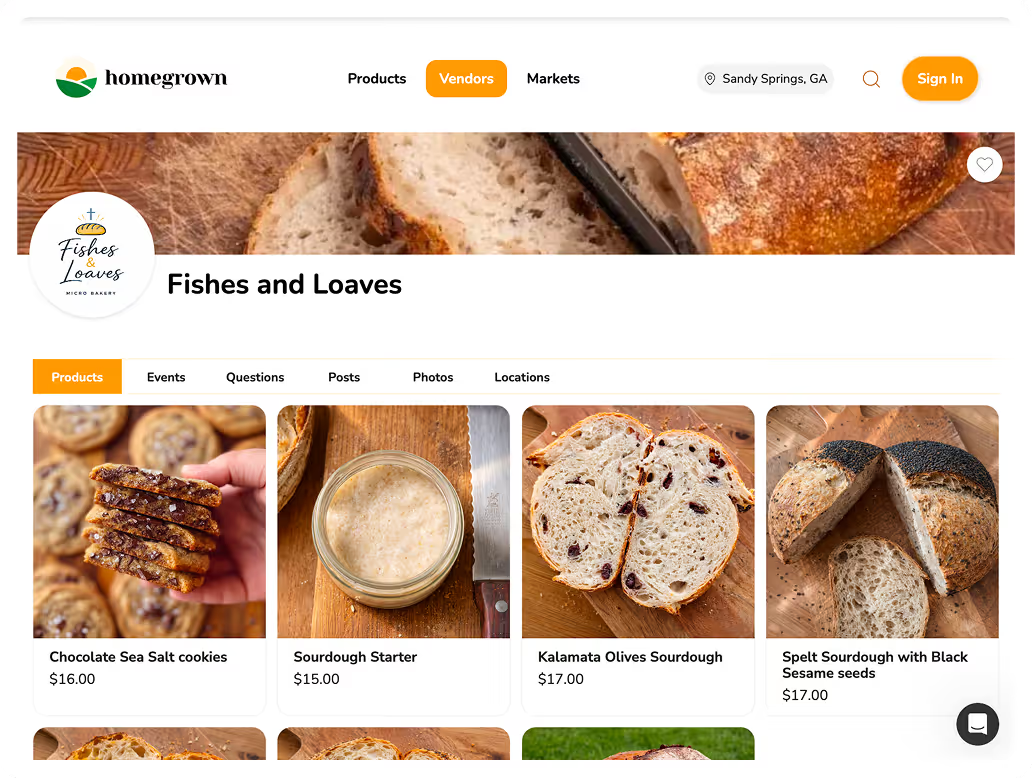
In a pull of the Homegrown catalog on September 27, 2026, 307 vendors listed 2,719 products, and 1,424 of them (52%) were in the Bakery category. We counted 161 bakery vendors, meaning vendors with at least half of their listings in Bakery, and counted every listing they had with no keyword filter. The median bakery vendor listed 7 products, and 115 of the 161 (71%) listed 10 or fewer. For most home bakers, the whole menu fits on the back of one card at one line per product.
How many products each bakery vendor lists on Homegrown
Source: Homegrown catalog pull, September 27, 2026. 161 vendors with at least half their listings in the Bakery category, every listing counted.
If your menu changes every week, skip the printed menu and print your schedule instead. A menu that is wrong by October costs you trust. A schedule stays true for a whole season.
The bakery business card ideas most likely to bring back orders are the ones that reach a customer right after they tasted your baking, which is why the card in the box matters more than a card on a counter. Five ideas fit a home bakery best:
Put two cards in every box, not one. One can go on the fridge, and the other can go to the coworker who asked where the bread came from. At about 21 to 28 cents a card for 100 Vistaprint cards with delivery (21 cents one-sided, 28 cents with the full-color back that holds your QR code), the second card adds about 21 to 28 cents to an order.
No, a home baker should print a pickup area on the card, not a street address, and share the exact address only after someone orders. A card gets passed around, left on café counters and pinned to boards. Your home address on it goes places you never see.
Here is what to print instead:
Homegrown builds this in. Its signup page lists a "Hide home address until purchase" setting that shows an approximate location on the storefront and marketplace and reveals the exact address only after purchase. On September 27, 2026, the Southern Grace Bakery storefront on Homegrown listed a pickup spot as "Near McClellan Boulevard" in Anniston with the line "Exact pickup address shared after your order is placed." The Local Loaf in Wright City, Missouri lists 8 products and a pickup at Woehrle General Store instead of a house.
Your state may require certain details on the package label itself, and that label is a separate thing from your business card. Hiding your address on the card does not change what the label must say. Check your state's current label rules before you decide what to print on either one.
A QR code on a bakery business card should be at least 1 inch square. Scanova's guide to minimum QR code sizes says "For print, don't go below 1 x 1 inch," and warns that anything under 2 by 2 centimeters, about 0.8 inch, runs a high risk of scan failure. Its quick table lists 0.8 inch as a close-up minimum for business cards, but the same guide's print rule is 1 inch, so treat 1 inch as the smallest you print. We checked that guide on September 27, 2026.
On a standard 3.5 by 2 inch card, a 1 inch code takes half the card's height and about 14% of one side. That is why the QR code usually goes on the back, with the menu or the order steps beside it. Four more rules keep it scannable:
Print the words "Scan to order" right under the code, in letters at least as tall as your phone number. A bare QR code on a bakery card could be a menu, a website, or an Instagram page, and the two words tell people it leads to an order.
The standard US business card measures three and a half by two inches, and for a home bakery the choices that matter are paper thickness, paper type and corners. Vistaprint's standard card is 14 point paper, printed on the front only. MOO's Original card is 16 point and printed on both sides. Vistaprint's page explains that each point is 0.001 of an inch, so a 16 point card is thicker than a 14 point card.
Scroll sideways to see every column.
| Choice | Common option | What it costs or means (checked September 27, 2026) | Good fit for |
|---|---|---|---|
| Size | 3.5 by 2 inches | Standard at both Vistaprint and MOO. MOO asks for a 3.66 by 2.16 inch design so the background bleeds past the cut | Every bakery, fits a wallet |
| Square | Square shape | Offered by both printers as an option | Cake and cookie bakers with round photos |
| Thickness | 14 point or 16 point | 14 point is Vistaprint's standard. 16 point is MOO's Original | 16 point for cards that ride in a box |
| Paper type | Matte, glossy, uncoated or kraft | Uncoated added $1.00 and kraft added $19.00 to 100 Vistaprint cards | Uncoated for writing on it, kraft for bread |
| Corners | Square or rounded | Rounded added $7.00 to 100 Vistaprint cards | Rounded for cards that get handled a lot |
| Back side | Blank or printed | Vistaprint prints the front only unless you upgrade; a full-color back took 100 cards from $14.99 to $21.99. MOO prints both sides at no extra cost, but its Original card is coated on both sides, which MOO says you won't be able to write on with a pen | Printed if you want a menu or punch card; pick an uncoated stock for a punch card you stamp or initial |
Sizes, options and add-on prices come from Vistaprint's standard business card page and MOO's Original business card page, both loaded September 27, 2026. The $21.99 price for a full-color back comes from Vistaprint's standard business card template gallery with 100 cards and a color back selected, the same day.
Choose uncoated paper if you plan to write on the card. Uncoated stock is the one sold for writing on: Vistaprint offers it as a standard paper for $1.00 more on 100 cards, and MOO describes its uncoated Luxe card as "write on either side!" That matters for a punch-card stamp or "Your cake is ready Saturday." Choose the thicker card if it rides on top of a loaf in a box, where it gets handled and bent.
A run of 100 bakery business cards costs about $15 to $45 before shipping at two big online printers, which works out to $0.15 to $0.45 a card. The $15 end is Vistaprint's card with a blank back. With a full-color back, the same 100 Vistaprint cards were $21.99, and MOO's $45.00 already includes both sides. We loaded both printers on September 27, 2026, and the full price picture looks like this:
Swipe sideways to compare the two printers.
| Printer and card | 50 cards | 100 cards | Per card at 100 | Back side | Delivery |
|---|---|---|---|---|---|
| Vistaprint Standard, 14 point, matte | $10.00 ($0.20 each), checked September 27, 2026 | $14.99 | $0.15 | Front only; double-sided is an upgrade | $5.99 standard, free on orders over $100 |
| Vistaprint Standard, 14 point, full-color back | Not shown | $21.99 | $0.22 | Printed in full color on both sides | $5.99 standard, or free once an order passes $100 |
| Vistaprint Standard on kraft paper | Not shown | $33.99 ($14.99 plus $19.00) | $0.34 | Front only; double-sided is an upgrade | $5.99 standard, free on orders over $100 |
| MOO Original, 16 point | $23.00 | $45.00 | $0.45 | Both sides included | $7.50 for 10 business days; $20.50 for 6 business days |
We checked these prices on Vistaprint's standard business card page and MOO's Original business card page on September 27, 2026. Prices are before tax. Vistaprint's delivery price was shown for one ZIP code and may differ for yours. The full-color back price came from Vistaprint's standard card template gallery with a color back selected, and the 50-card price from the same gallery with 50 cards and a blank back selected. MOO's delivery prices came from its own Shipping and Cost Calculator for 100 Original cards sent to Massachusetts. MOO showed $46.00 struck through beside the $45.00 price for 100.
Printer prices change often, and both sites run sales. The numbers above are what the pages showed on September 27, 2026. Load the page again on the day you order and compare the total with delivery, not the headline price.
The cost math is kind to a home baker. With delivery, 100 one-sided Vistaprint cards came to $20.98, or about $0.21 a card, and 100 with a full-color back came to $27.98, or about $0.28 a card. As an example, if one of the 100 one-sided cards brings back one customer who orders a $30 cake, the run is paid for with $7.85 left after card processing, before ingredients.
Any claim on a bakery business card needs to be true and provable, because a business card is advertising. The FTC's advertising guide for small businesses says advertising must be truthful and not deceptive, and that advertisers must have evidence to back up their claims. It also says letters from happy customers usually are not enough to back up a health or safety claim. Four kinds of claims need proof on a bakery card:
If a claim on your card turns out to be wrong, reprint. A new run of 100 one-sided Vistaprint cards was $14.99 on September 27, 2026, which is cheap next to handing out cards you cannot stand behind. We loaded the FTC guide and the eCFR text of 21 CFR 101.91 the same day. Your state may have its own advertising rules too, so verify your state's current rules if you plan to print any health or allergy claim.
If you bake gluten-free on purpose, the gluten-free baking business guide covers how to set up a kitchen that can back up the claim.
No, your business card does not replace the label your state requires on the package. Do not count on a business card tucked into the box to do the label's job, even if it lists your name, phone number and ingredients. Whether any required label detail can go somewhere other than the package is up to your state, so check your state's rule before you rely on a card for any of it. Keep the two jobs separate:
A simple test helps. If the information protects the customer, like ingredients and allergens, it belongs on the label your state asks for. If the information helps the customer order again, like your QR code, pickup days and lead time, it belongs on the card. At $0.15 a card for Vistaprint's one-sided run, you can afford to keep the card short and let the label do the legal work.
The cottage food labeling guide walks through the elements a cottage food label usually needs. Rules change, so verify your state's current rules on the state's own site before you print either one.
A home baker does not need a designer for a business card: the printer's own design tool, one good photo of your bake and your order-page QR code will get you there in about an hour. Vistaprint also offers a design service from $10.00 if you want someone else to set it up. Here is the do-it-yourself version:
Keep a copy of the design file with the date in its name. When you raise your prices in the spring, you will want to change one line, not start over.
A home baker should hand out business cards where people have just tasted the baking or are about to need a baker, which means inside boxes, at parties and at your booth. A card handed to someone who just ate your cake has a reason to be kept, while a card picked up from a stack on a counter often does not. The best places:
Handing out cards is cheap. At about $0.21 to $0.28 a card delivered from Vistaprint, one-sided or with a full-color back, 10 cards left beside a birthday cake cost $2.10 to $2.80.
If you want something bigger for a bulletin board, a card is too small to notice from across a room. The farmers market flyer ideas guide covers flyer sizes and where you can legally post them.
You can tell whether your bakery cards bring orders by asking every new customer how they found you and keeping a four-week tally next to what the cards cost. The SBA's guide to marketing tells small businesses to list what each piece of marketing costs and to measure the return, so you know which part is working. For a home baker, that fits on one index card:
If your order page shows visits, watch that number too. A Homegrown storefront shows its view count by day and by month, so a jump in views the week after a party with 10 cards on the table is a useful hint. It is only a hint, because Homegrown does not show which card someone scanned. For a cleaner test, point one batch of cards at one product page, such as your custom cake listing, and see whether that product gets more orders.
The QR code on your bakery business card should open a page where the customer can see your menu, pick a pickup day and pay, all in one visit. If it opens your Instagram, they still have to message you, wait for a reply and send money some other way, and some of them will stop there. A card does its best work when the scan ends with a paid order.
That is what a Homegrown storefront is built for. It costs $10 per month billed annually ($12.50 billed monthly) with no percentage fees beyond standard payment processing of 2.9% + $0.30 per order, which the vendor pays. It includes a QR code generator that downloads a high-resolution image for your cards, and a custom QR URL builder that points a code at one product, so your custom cake card can open your cake listing. You set pickup spots with their own name and description, and each pickup spot gets an order prep time, the notice Homegrown requires before each pickup date. That prep time covers everything ordered for that spot, weekly bread included. So keep it short for your regular bakes, and put your 2-week cake notice in the cake listing's description, where the customer reads it before paying, not only on the card.
Compare the other places a card's QR code usually points. Instagram DMs cost nothing, but every order is a conversation and a separate payment. Hotplate has no monthly plan and includes a loyalty program, adds a 5% + $0.55 service fee that the baker can pass to the customer's checkout or pay, and charges the baker 2.9% + $0.30 card processing on top. Square's free plan (Square Free) charges 3.3% + 30¢ per online card payment, and Square Plus is $49 a month per location with 2.9% + 30¢ online processing. Here is the full fee stack on a $20 order:
Scroll sideways to see every column.
| Where the QR code sends people | Monthly plan | Trial period | Platform or service fee | Card processing | Customer pays on a $20 order | Baker pays on a $20 order | Baker pays in a month of 50 orders at $20 |
|---|---|---|---|---|---|---|---|
| Homegrown | $10 billed annually ($12.50 monthly) | 7 days, no charge until day 8 | None, 0% commission | 2.9% + $0.30 per order, on the baker | $20.00 | $0.88 plus the plan | $54.00 ($56.50 on monthly billing) |
| Hotplate, fee passed to the customer | $0 | No plan to trial | 5% + $0.55, added to the customer's checkout | 2.9% + $0.30, baker's side | $21.55 | $0.88 | $44.00 |
| Hotplate, baker covers the fee | $0 | No plan to trial | 5% + $0.55, covered by the baker | 2.9% + $0.30, also the baker's | $20.00 | $2.43 | $121.50 |
| Square Free | $0 per location | No plan to trial | None listed | 3.3% + 30¢ online, baker pays | $20.00 | $0.96 | $48.00 |
| Square Plus | $49 per location | 30 days | None listed | 2.9% + 30¢ online, baker pays | $20.00 | $0.88 plus the plan | $93.00 |
We checked these fees on Homegrown's signup page, Hotplate's pricing page and Square's online store plans page on September 27, 2026. Card processing is figured on the $20 price; a platform that charges it on the total with tips and tax runs a few cents higher.
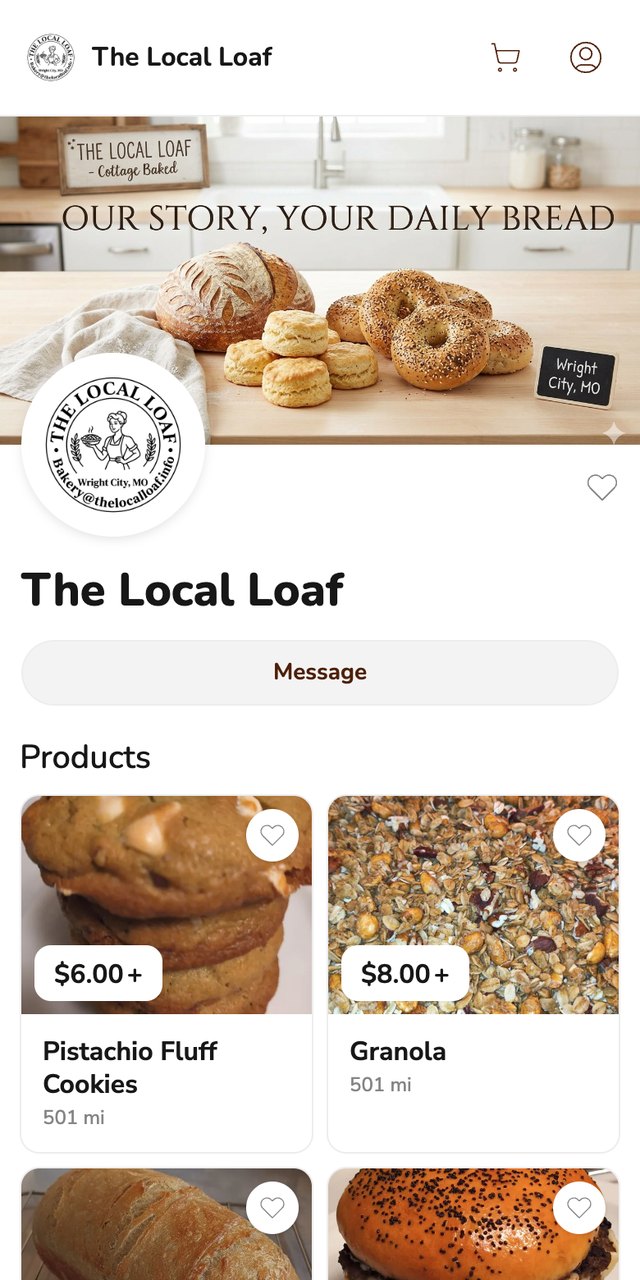
Homegrown has limits worth knowing before you print its QR code on 100 cards. Customers create a Homegrown account to place their first order. Your storefront is listed on the Homegrown marketplace, but plan on most orders coming from people you send to your own link, which is exactly what the card is for. Homegrown does not design or print business cards, does not show which card a customer scanned, and has no timed drop or countdown release feature. Its signup page lists no loyalty or rewards feature either, so a punch card stays on paper, stamped by you at pickup.
If your cards already point at your DMs, the switch is one reprint. Set up a Homegrown storefront, download its QR code, and your next 100 bakery cards open a page where people order and pay for Saturday pickup without waiting on your reply.
The bakery business card mistakes that cost the most orders are the ones that leave a customer with no way to order: no QR code, a QR code that opens the wrong page, or a menu that went out of date. Eight to check before you print:
Print the smallest run that lasts two months. A bakery card should be cheap enough to give away two at a time, and current enough that every line on it is still true.
A home bakery business card should show your bakery name, what you bake in a few words, how to order, your lead time for custom orders, a pickup area, a QR code of 1 inch or more, and one way to reach you. Leave off your home street address. Use the back for a short menu, a punch card, or your weekly pickup schedule.
On September 27, 2026, Vistaprint listed 100 standard one-sided cards at $14.99, or $0.15 each, or $21.99 with a full-color back, plus $5.99 standard delivery. MOO listed 100 of its thicker Original cards, printed on both sides, at $45.00, with delivery from $7.50. Kraft paper, rounded corners and other upgrades add to the price, so compare totals with delivery on the day you order.
Yes, a bakery business card should have a QR code, because a customer who finds the card at home wants to order right then, not send a message and wait. Make it 1 inch across or bigger, print "Scan to order" under it, and point it at a page where people can pick a pickup day and pay.
Good bakery business card ideas for a cottage baker are a card in every box, a punch card on the back, a separate card for custom cakes, a holiday order card printed for one season, and a referral card for a friend. For design, kraft paper with a stamped logo or one photo of your most popular bake keeps the card easy to read and makes it look like your kitchen instead of a template.
Only if you can prove it. Under federal rules, food labeled gluten-free must contain less than 20 parts per million of gluten, and the FTC says advertisers must have evidence for their claims. A home kitchen that also bakes wheat bread will have a hard time proving that, so describe what you do instead.
Order 50 to 100 bakery business cards for a first run. Menus, prices and pickup days change, and a smaller run means you can fix a line without throwing away 400 cards. Order more once the design has held steady for a season.
These five guides pick up where a bakery business card leaves off, from the order page to the box. Each one goes deeper on a question this guide only touched on:
A bakery business card is a 15-to-45-cent promise that ordering again will be easy. The customer who found it in the box should be able to scan it on a Tuesday night, see what you are baking this week, pick Saturday pickup and pay, without sending you a single message.
That only works if the code on the card leads somewhere that takes the order. A Homegrown storefront is $10 per month billed annually, with no percentage fees beyond standard payment processing, and it gives you the printable QR code to put on the card. Your next run of 100 cards costs about $15 to $45 before shipping at the printers above, with $15 buying a blank back. Make the first run small, put two cards in every box, and ask each new customer how they found you.
Start your Homegrown storefront, print its QR code on your next run of bakery business cards, and let the card in every box bring back next week's order.