

The short version: Put one direct link in your TikTok bio, and make it the page where a viewer sees this week's menu, prices and pickup times and pays, not a list of other links or an invitation to DM you. TikTok's help page ties the website link to having at least 1,000 followers or a Verified Business Account, and a Verified Business Account loses TikTok's general music library. TikTok opens profile links in its own in-app browser, limits how far people can click through chains of links there, and tells creators to add direct links. Homegrown is $10 a month billed annually ($12.50 monthly) with 0% commission and 2.9% + $0.30 card processing paid by the vendor, so a $20 order costs you $0.88 plus the plan.
Checked on October 15, 2026: TikTok's Help Center pages on profile links and account types, plus the pricing pages of Homegrown, Hotplate, Square, Linktree and Venmo. Homegrown customers create an account to place their first order, and Homegrown has no drops feature. Your storefront is listed on Homegrown's marketplace, but plan on most orders coming from people you send to your own link.
Say a cinnamon roll video gets 4,000 views on a Tuesday night. By Wednesday you have eleven comments asking "how do I order?" and three DMs asking the same thing, and you still have no idea how many pans to bake. The video did its job. The bio link did not.
This guide is for the part-time home baker, jam maker or farm stand that posts on TikTok and sells for pickup. It covers who can add a link at all, what the link should point to, what each option costs per order, and the exact words to put around it so viewers actually tap.
Your TikTok bio link should go straight to one page where a viewer can see this week's menu with prices, pick a pickup time and pay, without sending you a single message. Anything else adds a step between a hungry viewer and a paid order, and every step loses people. A viewer who found you through a 15-second video has no reason to dig through your profile, send a message and wait for a reply. Say 30 people tap your link after a good video: a page that takes the order lets every one of those 30 order on the spot, while a page that says "message me" only reaches the ones who bother to write.
Here is what that page needs to show on a phone screen:
If you are already using a link page like Linktree on Instagram, the same question applies on TikTok. We compared the two head to head in Linktree vs a real storefront for food vendors, and the short answer carries over: a list of links is a menu of places to go, while an ordering page is the place itself.
The one exception is a vendor who sells in more than one way, say weekly pickup and a monthly pop-up at a brewery. Even then, one ordering page that lists both pickup options usually beats a link page with two buttons.
TikTok lets you add a website link to your profile if you have at least 1,000 followers or a Verified Business Account. That comes straight from TikTok's own help page on adding a website link to your profile, which we loaded on October 15, 2026. A brand new personal account followed by 40 people cannot add a website link yet, no matter how many times it opens Edit profile.
TikTok calls the everyday account type a General TikTok Account (most people call it a personal account). TikTok's account types page says these accounts can post a website link once they reach 1,000 followers. A Verified Business Account can post a website link without reaching the follower count, once TikTok has verified the account as a business.
A few details trip people up:
Your bio text, the short description under your name, is available to every account from day one. So even before you qualify for a link, you can say what you sell, where and when.
A Verified Business Account unlocks the bio link right away, but it costs you TikTok's general music library, and that is the trade-off to weigh. TikTok's account types page says Verified Business Accounts use the Commercial Music Library, a set of songs cleared for business use, and "don't have access to our general music library." Personal accounts get both libraries.
TikTok also says that "anyone whose primary goal on TikTok is to promote their business (either a product or service) should use a Verified Business Account." Our guide on using TikTok to sell homemade food recommends starting personal for the trending sounds, so here is the trade laid out side by side.
Scroll sideways to see every column.
| What you get | General TikTok Account (personal) | Verified Business Account |
|---|---|---|
| Website link in your profile | Yes, once you have at least 1,000 followers | Yes, at any follower count |
| Music | General music library plus the Commercial Music Library | Commercial Music Library only |
| Analytics | TikTok Studio, after at least one public post | Business Suite, after at least one public post |
| What TikTok asks of you | Grow to 1,000 followers | Verify the business, and TikTok may ask you to verify again to keep the features |
| Who TikTok says it suits | General users, content creators and most public figures | Anyone whose main goal on TikTok is to promote a business |
We checked every row on TikTok's "Account types on TikTok" help page on October 15, 2026. TikTok notes that features may vary by region.
If most of your videos ride a trending sound, losing the general music library can cost you more views than the bio link earns. TikTok's account types page is plain about the library part when we checked it on October 15, 2026: business accounts get the Commercial Music Library only. The effect on your views is our read, not TikTok's. Decide which matters more for you this season, and remember you can grow a personal account to 1,000 followers instead. If you switch back to personal later, TikTok says your verification is not saved and you would have to verify again.
A simple way to decide: if trending sounds drive most of your views, stay personal and grow to 1,000 followers. If you mostly post your own voice or original audio, verifying gets you the link sooner, though TikTok says verification may take up to 5 business days and the documents it asks for vary by location. If you are already near 1,000, keep the personal account and the sounds.
Before you qualify for a link, put your store's name and a short web address in your bio text and say it out loud in every video, so viewers can type it or search it. The text will not be clickable, but a short, memorable address still turns a curious viewer into a customer, just with one extra step.
Ways to bridge the gap while you grow to 1,000 followers or wait on verification:
For the market table, our guide to QR code ideas for farmers market vendors has layouts that work at a booth.
Expect the typed route to convert worse than a tap. Someone has to remember the name, leave TikTok, open a browser and search, which is 4 steps instead of 1. That is the main reason the link is worth chasing as soon as you can.
TikTok opens profile links inside its own in-app browser and limits how people click through chains of external links there, so a link page in the middle can trigger a message telling your customer to switch browsers. TikTok's help page says it applies these "safety measures that limit how people can browse external link chains" to every account, and that "you may see a message prompting you to open the page in your device's web browser."
In the same section, TikTok writes: "We recommend that creators add direct links so people can access the intended site in just a few steps." Our read: a direct link means skipping the link page in the middle.
Picture the two paths a viewer can take after tapping your link:
Each extra step is a chance to lose someone who was mildly interested. On a food video, interest fades fast. The person who wanted cinnamon rolls at 9 p.m. is much less likely to come back to your profile 14 hours later, at 11 the next morning, to finish the job.
A link page can still make sense if you sell several very different ways and genuinely need 3 or more destinations. For most home food vendors with one weekly menu, it is one page too many.
For a food vendor with one weekly menu, the link should go straight to a page that takes the order, because Linktree's free plan is a list of links, not a menu with pickup times and order counts. Linktree's pricing page, loaded October 15, 2026, lists Free at $0 with "unlimited basic links" and "email and phone sign-ups," Starter at $6 a month billed annually ($8 monthly), Pro at $12 billed annually ($15 monthly) and Premium at $30 billed annually ($35 monthly).
Here is how the common destinations behave once a viewer taps.
Swipe the table left to compare every destination.
| Where the link goes | What the viewer sees first | Can they pay there? | Do they pick a pickup time there? | Steps from your profile to your menu |
|---|---|---|---|---|
| No link, "DM to order" in your bio | Nothing to tap; they have to message you | No, you send a payment request later | No, you agree on it in messages | Depends on how fast you reply |
| Linktree Free page | A list of buttons | Not for a pickup order; the buttons lead to other pages | Only if the next page does it | 2 or more |
| A Google Form | Questions to fill in | No, you collect payment separately | Only as a question you type yourself | 1, then you follow up by hand |
| Hotplate drop page | Your menu for that drop window | Yes | Yes | 1 |
| Square Online site | Your website's home page or shop page | Yes | Yes, Square lists pickup with ordering windows on every plan | 1 or 2, depending on which page you link |
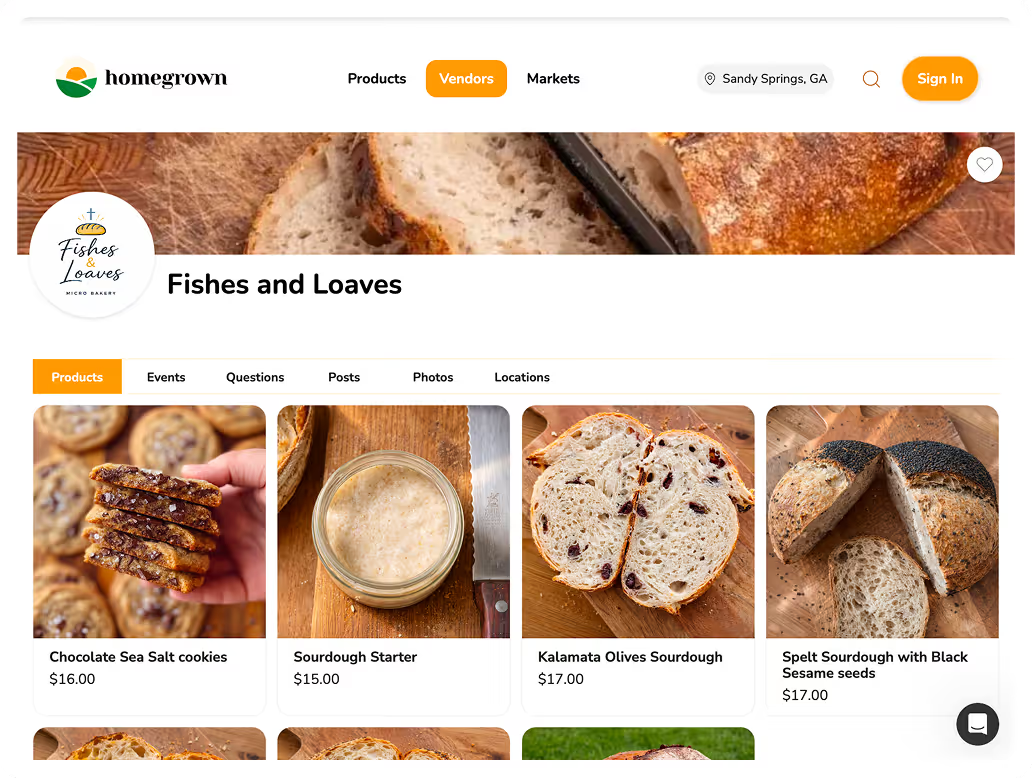
| Homegrown storefront | Your menu, photos and prices | Yes | Yes, each order arrives with a pickup time or a delivery address | 1 |
We checked Linktree, Hotplate, Square and Homegrown on their own pricing and plan pages on October 15, 2026. "Steps" counts taps from your TikTok profile to the first screen that shows your products and prices.
The Linktree paid plans add features like custom designs and commerce tools, but the problem on TikTok is not how the list looks. It is that there is a list at all, sitting between a viewer and your menu.
If you already pay for Linktree Pro at $12 a month billed annually, that is more than Homegrown's $10 per month on annual billing, and Linktree still needs an ordering page behind it.
On a $20 order, the vendor pays $0.88 on Homegrown plus the $10 plan, $0.96 on Square's free plan, about $0.88 to $0.92 in 2.9% + $0.30 card processing on Hotplate's default (the customer pays the $1.55 service fee on top), and $0.48 through a Venmo business profile with orders taken by hand. At 50 orders a month, that works out to $54.00, $48.00, about $44.00 to $46.25, and $24.00 respectively, before you count the time you spend answering messages.
Every row shows the whole fee stack: the plan, any platform or service fee, card processing, and who pays each part.
Slide the table to the left for the full fee stack.
| Bio link destination | Monthly plan | Trial | Platform or service fee | Card processing | Customer pays on a $20 order | Vendor pays on a $20 order | Vendor pays for 50 orders at $20 in a month |
|---|---|---|---|---|---|---|---|
| Linktree Free, then DMs and a Venmo business profile | $0 (Linktree Free) | None needed | None | 1.9% + $0.10 per payment, charged to the business | $20.00 | $0.48 | $24.00, plus every message you answer by hand |
| Hotplate, default | $0 | None needed | 5% + $0.55 on the subtotal, paid by the customer | 2.9% + $0.30, paid by the vendor | $21.55 | About $0.88 to $0.92 | About $44.00 to $46.25 |
| Hotplate, vendor covers the fee | $0 | None needed | 5% + $0.55, paid by the vendor | 2.9% + $0.30, also the vendor's | $20.00 | $2.43 | $121.50 |
| Square Online, Square Free | $0 (Square Plus is $49 a month per location) | 30 days on Square Plus | None | 3.3% + 30¢ online on Free (2.9% + 30¢ on Plus) | $20.00 | $0.96 | $48.00 |
| Homegrown storefront | $10 billed annually ($12.50 monthly) | 7 days, no charge until day 8 | None, 0% commission | 2.9% + $0.30, paid by the vendor | $20.00 | $0.88 plus the plan | $54.00 ($56.50 on monthly billing) |
Every price comes from the company's own page, loaded October 15, 2026: Venmo's business profile fee article, Hotplate's pricing page, Square's online store plans and fees pages, Linktree's pricing page and Homegrown's signup page. Hotplate's own post "What Hotplate does" says the fee goes to the customer by default; its pricing page says you can pay it yourself or pass it on. The Hotplate range depends on whether the card fee is figured on the $20 subtotal ($0.88) or on the full $21.55 the customer pays ($0.92). That $0.92 is rounded from $0.925, which is why 50 orders come to $46.25 and not $46.00. Adding Linktree Pro to any row adds $12 a month billed annually.
The Venmo row looks cheapest, and on fees alone it is. Venmo's business profile fee page lists 1.9% + $0.10 per payment, and says customers who pay a business profile with a credit card skip Venmo's usual 3% credit card fee. What the row does not show is the work: every order is a conversation, a payment request and a note on paper about who wants what and when.
Hotplate's default is cheap for you because your customer pays the $1.55 service fee and you pay only the 2.9% + $0.30 card fee. That is a real choice some vendors like. It also means a $20 pan of rolls shows up as $21.55 at checkout, which is worth seeing before you put that link in front of thousands of TikTok viewers.
If your TikTok videos are getting comments like "how do I order?", the fix is a link that answers the question before anyone has to ask it. Homegrown gives you one storefront link with your photos, prices, sizes and pickup details on a single phone-friendly page, for $10 per month billed annually with no percentage fees beyond standard payment processing (2.9% + $0.30, paid by you, never added to your customer's total).
Compared with the other common destinations:
The parts that matter for TikTok traffic specifically:
Honest bounds: customers create a Homegrown account to place their first order. There are no drops or countdown releases. Your storefront is listed on Homegrown's marketplace, but plan on most orders coming from people you send to your own link, which on TikTok means your bio. You can set up your storefront and test the link during the 7-day trial, with no charge until day 8.
Adding the link takes a few taps and a paste in the TikTok app once your account qualifies: Profile, Edit profile, Add next to Links, then follow TikTok's steps to paste your ordering page address. Those are TikTok's own steps from its help page, checked October 15, 2026. The extra steps below are ours, and they are the ones that catch a broken link before a customer does.
If Links has no option to add a website, you are not there yet: under 1,000 followers on a personal account, or a business account that has not been verified. Go back to the bridge tips above and keep posting.
One more thing to check on the test order: the page should look right on a small phone screen. TikTok is built as a phone app, so expect most of your customers to tap that link on a phone, often at night, often one-handed.
The bio text above your link should answer 3 questions in a line or two: what you make, where and when people pick up, and when ordering closes. Your link is the action. The bio text is the reason to take it. "Home bakery, link below" gives nobody a reason to tap.
Templates you can adapt, with your own product, town and days:
A few rules that make these work:
If you sell on Instagram too, our guide on what to write in your Instagram bio when you sell food has more templates, and most of them work on TikTok with small edits.
Tell viewers once, near the end of every video, in under 5 seconds: what they can order, the day, and "link in my bio." Say it out loud and put it on screen as text, because some viewers watch with the sound off. Viewers do not mind a clear next step. They mind being sold to for the whole video.
Lines that fit naturally at the end of a food video:
Then use the comments. Pin one that repeats the line: "Ordering for Saturday pickup is open at the link in my bio, closes Thursday 8pm." When someone asks "how much?", answer with the price and the same pointer, so the next person scrolling sees the answer too. Our guide on answering TikTok comments to drive orders covers that reply pattern in detail.
Keep the order details out of the caption body if they change weekly. The pinned comment and the bio are easy to update; an old caption that says "order by Thursday" on a video still getting views in March will confuse people.
Before you post any video that shows a product, set that product's quantity on your ordering page to the number you can actually make, so a video that gets 50,000 views sells out your batch instead of burying you in orders you cannot fill. TikTok views come in waves you cannot predict. A quantity cap on your link page is what stands between a viral moment and an impossible weekend.
Count your real capacity, not your hopes. If your oven fits 4 loaves at a time and you can run 6 rounds on bake day, your number is 24 loaves. Set the quantity to 24 before the video goes up, and add a line to the product description saying when the next batch opens. A sold-out label with a date on it keeps the customer; an order you have to cancel loses them.
A short checklist to run the night before you post:
Do this on a schedule, not when you remember. If you post 3 times a week, tie it to the night you plan your bake.
Write down the date of each video and count the orders that come in during the next 72 hours; after 4 to 6 videos, you will start to see which ones sell. You do not need special software for this. A notebook or a phone note with three columns works: the date you posted, what the video showed, and the orders that came in over the next three days.
What to look at once you have a few weeks of notes:
TikTok's own analytics help too. TikTok's account types page says analytics show how your content performs, including follower metrics, once you have at least one public post. Watch your profile views next to your order count. If profile views jump and orders do not, people are reaching your profile and stopping, which points at the bio text or the link page, not the video.
For ideas on which videos to test, our list of TikTok content ideas for food vendors has 15 formats to rotate through.
The most expensive bio link mistake is a link that works but does not end in a paid order, like a link page, a form or an Instagram profile that still asks people to message you. Every one of these sends interested viewers into a back-and-forth that some of them will not finish.
The ones to check for, roughly from most to least costly:
None of these are hard to fix. Most take under 10 minutes once you notice them.
Vendors who turn TikTok views into orders treat the bio link as part of the menu, updating it every time they update the bake schedule, and they repeat the same order wording in every video. The video gets attention. The link, the bio text and the pinned comment do the selling, so they get the same care as the filming.
Habits worth copying:
If you want to get more out of the videos themselves, our guide on filming short food videos for Reels and TikTok covers lighting and how to film a post-ready clip in under 5 minutes.
TikTok's Help Center ties adding a website link to having at least 1,000 followers or a Verified Business Account (checked October 15, 2026). If you have a personal account under 1,000 followers, or a business account that is not verified, you will not be able to add a website link. Until then, put your shop's name and a short web address in your bio text so viewers can type it.
No, a personal TikTok account can add a link once it reaches 1,000 followers. A Verified Business Account can add one at any follower count, but it only gets TikTok's Commercial Music Library, not the general music library. A home food vendor who leans on trending sounds may prefer to grow the personal account instead.
For a food vendor with one weekly menu, linking straight to an ordering page is the simpler setup. TikTok's Help Center recommends direct links and says it limits how people click through chains of links in its in-app browser. Linktree Free is a page of links that still needs an ordering page behind it.
The best TikTok bio link for a home bakery is a page that shows this week's menu with prices, lets the customer choose a pickup time, and takes payment before you bake. Homegrown does that for $10 per month on the annual plan, with card fees of 2.9% + $0.30 per order and no commission. Hotplate (no plan, 2.9% + $0.30 to you, plus 5% + $0.55 to your customer by default) and Square Online (Square Free, 3.3% + 30¢ online) can also take paid pickup orders.
TikTok's help page describes one website link, plus a Lemon8 account where available. The simplest setup for a food vendor is one link to one ordering page. If you sell several ways, list each pickup option on that ordering page rather than adding a link page in front of it.
No, tapping a link on a TikTok profile opens it in TikTok's in-app browser first, according to TikTok's Help Center. For some chains of external links, TikTok may show a message asking the person to open the page in their phone's own browser. Test your link from TikTok on a phone before you point viewers at it.
These guides cover the other pieces of selling from TikTok: what to post, how to answer the comments your videos get, and how TikTok Shop compares with sending people to your own ordering page. Pick the one that matches the step you are stuck on. If you are not posting yet, start with the first; if your videos already get views but few orders, the comments guide and the Linktree comparison are the two to read next.
Your next food video is going to send people to your profile whether you are ready or not. Give them one tap to a menu with prices, a pickup time and a checkout, and the comments asking "how do I order?" turn into orders you can plan a bake around.
Here is the short list for this week:
Homegrown is $10 a month billed annually ($12.50 monthly), with 0% commission and card fees of 2.9% + $0.30 that you pay, so a $20 order costs you $0.88 plus the plan. Build your Homegrown storefront tonight, paste the link into TikTok, and test it from your phone before your next post.