


The short version: Cottage food businesses need ordering systems built for local pickup, not restaurant delivery or national shipping. Homegrown ($10 per month with payment processing built in at 2.9% + $0.30) is a purpose-built option with a 15-minute setup and one shareable ordering link. Other strong options include Bakesy ($9.99 to $17.99 per month plus payment processing on top, best for order management and invoicing), and Square Online (free tier, basic ordering with 3.3% + 30 cents processing). Avoid restaurant ordering systems like Toast or DoorDash — they are designed for dine-in and delivery, not cottage food pickup. For most cottage food vendors, the right ordering system costs under $15 per month and does three things well: shows your products, collects payment, and schedules pickup.
Checked September 12, 2026: Castiron is no longer an option. Its old web address now shows an unrelated casino page. Bakesy lists its $9.99 and $17.99 plans with a 30-day free trial, and charges 3.9% + $0.30 card processing through its optional Secure Payments. Square Online's free plan still charges 3.3% + 30 cents on online card payments.
The best online ordering system for most cottage food businesses is Homegrown, which gives you a simple storefront with built-in payments and local pickup and delivery scheduling for $10 per month. You add your products, set pickup times, share one link, and customers order and pay on their phone. No website needed, no shipping to configure, no technical skills required. Setup takes about 15 minutes.
Taking orders online is one of the biggest operational upgrades a cottage food vendor can make. Before an ordering system, the typical workflow looks like this: a customer sends a DM on Instagram, you reply with what you have available, they ask about pricing, you send a Venmo request, they pay three days later, and you try to remember what they ordered when pickup day arrives.
An online ordering system replaces every step of that with one link. Customers see your products, prices, and availability. They place an order. They pay. They choose when to pick up. You wake up to a list of exactly what to make.
Here is what an ordering system fixes:
If you sell any cottage food product regularly — bread, cookies, jam, honey, sauce, candy — an ordering system pays for itself in time saved after the first week.
To put a number on your own week, our free order volume calculator estimates how much time DM orders are costing you.
A cottage food ordering system needs five things: product listings with prices, built-in payments, pickup scheduling, one shareable link, and a setup you can finish in a day.
Not every ordering system works for cottage food. Restaurant systems assume you have a menu, tables, and delivery drivers. General e-commerce platforms assume you ship products. Cottage food businesses need something much simpler.
Here are the five features that actually matter:
Features that do NOT matter for cottage food businesses:
The simpler the system, the better it works for cottage food. Every extra feature is a configuration step you do not need.
In a pull of the Homegrown catalog on August 14, 2026, 219 vendors listed 1,804 products. The median vendor listed 6 products, and 99 vendors listed 5 or fewer. Bakery products made up 876 of the 1,804. A menu that short fits a simple ordering link with a pickup day better than a full online store with shipping.
Homegrown vendors by number of products listed
All 219 vendors in a pull of 1,804 products from the Homegrown catalog on August 14, 2026.
For most cottage food vendors who sell set products for pickup, Homegrown at $10 a month is the best fit. Bakesy, Square Online, Google Forms and the free plan from Cottage CMS each suit a narrower need.
Five ordering systems work for cottage food businesses. Each one fits a different selling style. Here is what they cost, what they do, and who they are built for.
Homegrown is an online storefront built for local vendors who sell for pickup or local delivery. It is built for cottage food businesses because every feature is designed for how they sell: products listed, customer orders, payment collected, pickup scheduled.
Here is what you get:
A few more Homegrown tools matter for cottage food. You can set order cutoff dates, see an order summary for each pickup day, track inventory with low-stock alerts, and list allergens and ingredients on every product.
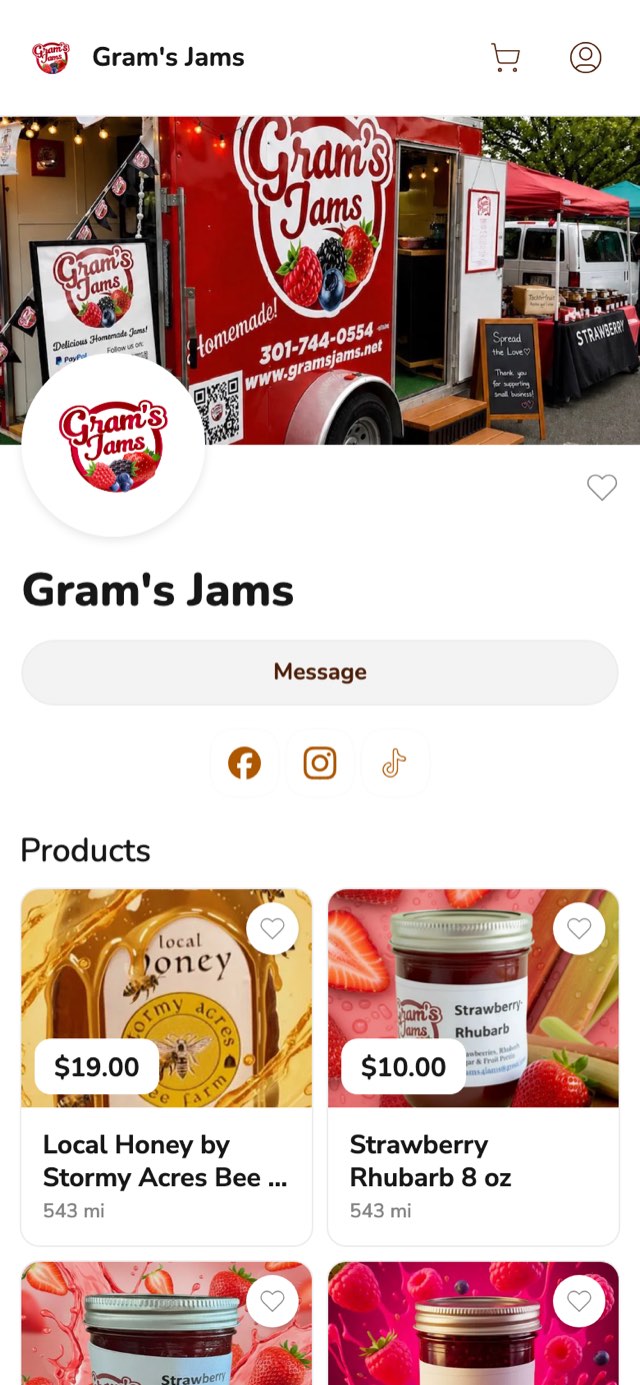
The workflow is straightforward. You add your sourdough loaves, cookie boxes, and jam jars. You set pickup for Saturday 9 AM to noon at your home address. You share your link on Wednesday. By Thursday, you have a list of orders. You bake Friday. Customers pick up Saturday. Done.
Pros:
Cons:
Two notes on that list. The marketplace listing is a small extra, and most orders come from customers you send to your own storefront link. Homegrown also has no card reader, but a customer at your farmers market table can scan your storefront's QR code and order and pay on their own phone.
On price, the $10 plan is billed yearly, or $12.50 month to month. Bakesy Standard at $9.99 and the free plans from Square Online and Cottage CMS cost less before card processing.
Best for: Any cottage food vendor who sells standard products for local pickup and wants the simplest ordering system available.
If you are spending more than an hour per week managing orders through DMs and Venmo, a Homegrown storefront replaces that entire workflow with one link that handles everything.
Castiron was a storefront platform designed for food creators who take custom orders, such as birthday cakes, decorated cookies and event platters. It was free to create an account and charged a fee on each sale.
Key features:
Pros:
Cons:
Best for: Home bakers who primarily took custom orders. For custom orders today, look at Bakesy.
Castiron shut down in late 2025. On September 12, 2026, its old address, castiron.me, showed an unrelated casino page. This section stays as a record of what it offered. Its exact fee can no longer be checked.
For custom orders today, Bakesy's pricing page lists customer order forms on both of its plans.
Bakesy is a business management platform for home bakers that goes beyond ordering to include invoicing, recipe costing, and customer management.
Key features:
Pros:
Cons:
Best for: Established home bakers who need business management tools beyond ordering.
Square Online's free plan costs $0 a month and charges 3.3% + 30 cents on each online card payment, according to Square's pricing page on September 12, 2026.
Square Online is Square's built-in website and ordering feature. If you already use Square for card payments, the free tier adds a basic online ordering page.
Key features:
Pros:
Cons:
Best for: Vendors who already use Square at farmers markets and want to add basic online ordering without a new platform. If you want something more purpose-built, our Square Online alternative comparison covers better options for local food vendors.
You can start with Google Forms for orders and Venmo or Cash App for payments. It works but creates significant manual work.
How it works:
Pros:
Cons:
Best for: Vendors taking their very first orders who want zero cost. Upgrade to a real ordering system as soon as you are consistently getting 5 or more orders per week. As Amycakes Bakes' guide to selling baked goods online puts it from the baker's side: "Online cake orders saved us time as they eliminated unnecessary consultations."
Cottage CMS has a free plan with a storefront, pre-order windows and checkout through Square, with Square's card processing on each order, and its pricing page says Free checkout may include a small Cottage CMS service fee. It is a sixth option this guide did not originally cover. Prices below were checked on its pricing page on September 12, 2026.
Best for: Vendors who want a free storefront with pre-order windows and are comfortable connecting a Square account.
Swipe sideways to see every column.
| System | Monthly Cost | Transaction Fee | Pickup Scheduling | Delivery Scheduling | Custom Orders | Setup Time (our estimate) |
|---|---|---|---|---|---|---|
| Homegrown | $10/mo yearly ($12.50 monthly) | 2.9% + 30¢ | Yes | Yes | No | 15 min |
| Castiron (closed) | Closed | Closed | No | N/A | Yes | Closed |
| Bakesy | $9.99-17.99/mo | 3.9% + 30¢ (Secure Payments) | No | No | Yes | 1 hour |
| Square Online (Free) | $0 | 3.3% + 30¢ | Basic | Basic | No | A few hours |
| Google Forms + Venmo | $0 | 1.9% + 10¢ (Venmo business profile) | No | No | No | 15 min |
Checked on each company's site on September 12, 2026. Castiron has shut down. Bakesy's payments guide lists 3.9% + $0.30 card processing for its optional Secure Payments.
For a cottage food vendor doing $800 per month in online orders (32 orders of $25):
Bakesy's total assumes customers pay by card through Bakesy Secure Payments.
Among dedicated ordering systems, Square Online Free is cheapest in raw fees at this volume, but its pickup scheduling is basic. Homegrown and Bakesy serve different needs: Homegrown for product-based ordering with pickup, Bakesy for order management and invoicing.
On a $25 order, card fees come to about $1.03 on Homegrown and $1.13 on Square Online's free plan. At 32 orders a month, those fees cost more than Homegrown's $10 plan, so count them before you compare monthly prices.
Scroll sideways to see every column.
| System | Monthly plan | Platform fee | Card processing | Fees on one $25 order | Monthly total, 32 orders ($800) |
|---|---|---|---|---|---|
| Homegrown | $10 billed annually ($12.50 monthly) | None | 2.9% + 30¢, built in | about $1.03 | $42.80 |
| Square Online, free plan | $0 | None | 3.3% + 30¢ online | about $1.13 | $36.00 |
| Square Online, Square Plus | $49 per location | None | 2.9% + 30¢ online | about $1.03 | $81.80 |
| Bakesy Standard | $9.99 ($17.99 Premium) | None | 3.9% + 30¢ (Secure Payments) | about $1.28 | $50.79 |
| Cottage CMS Free | $0 (Pro $20 monthly) | Possible small service fee on Free checkout | Through Square, rate not listed | Not listed | $0 plus Square processing and any service fee |
| Google Forms + Venmo | $0 | None | 1.9% + 10¢ on a Venmo business profile | about $0.58 | $18.40 plus your time |
Of the ordering platforms with a published card rate, Square Online's free plan costs the least at $36.00 for 32 orders. Homegrown costs $6.80 more at $42.80 and includes pickup scheduling, local delivery zones, and sales tax that is calculated and remitted for you.
Before you set prices, run your costs through our free pricing calculator so these fees fit inside every order.
Your state's cottage food law decides whether you can take orders online and how the food reaches the customer. Two large states show how far the rules differ:
Both states were checked on September 12, 2026, and cottage food rules change. Look up your own state before you offer delivery or shipping. Our cottage food laws by state guide collects the rules in one place. Homegrown handles local pickup and local delivery, with no nationwide shipping, so you decide where each order goes.
Choose by how you sell: Homegrown for set products picked up locally, Bakesy for custom orders and invoices, and Square Online if you already run Square at a farmers market.
Here is the quick decision:
For most cottage food vendors who have moved past the "testing" phase and regularly sell products, the answer is a purpose-built ordering system. You do not need a restaurant platform. You do not need a full e-commerce website. You need one link where customers can see your products, order, pay, and schedule pickup.
If you have been learning how to sell baked goods and are ready to stop juggling DMs, a Homegrown storefront is the simplest way to take your cottage food ordering online. If you are also exploring which platform to sell food from home, that guide covers the broader landscape beyond just ordering systems.
You do not technically need one, but it is the single most impactful tool for saving time and growing sales. Without an ordering system, you manage every order through DMs, texts, and manual payment requests. With one, customers order and pay in under two minutes, and you see a clean list of what to make. Baking Subs puts the time saved at 3 to 5 hours a week, which is a lot of baking time for $10 a month.
Google Forms combined with Venmo or Cash App is free but requires significant manual work. Among dedicated platforms, Homegrown costs $10 per month billed yearly, with built-in payments and pickup scheduling. Castiron has shut down. Two free plans also take payment with each order: Square Online's free plan, at 3.3% + 30 cents per online card payment, and Cottage CMS's free plan, which runs checkout through Square with Square's card processing and a possible small Cottage CMS service fee on top.
You can, but it is not recommended. Restaurant systems like Toast, DoorDash, and ChowNow are built for dine-in service, delivery logistics, tipping, and menu management that cottage food businesses do not need. They are more complex, more expensive, and require configuration that does not apply to your business. ChowNow's plans start at $249 a month plus 2.95% + $0.29 per transaction, and Toast's Point of Sale plan starts at $69 a month before card processing, according to their pricing pages on September 12, 2026. Use a system designed for local food vendors and pickup-based selling.
Share your ordering link everywhere: text it to regular customers, post it on Instagram and Facebook, print it on a card at farmers markets, and include it in your email signature. Tell customers directly: "You can see everything I sell and order for pickup at this link." Online ordering is faster than DMs, and customers can browse at their own pace.
Both work, but an ordering system is dramatically more efficient once you get 5 or more orders per week. Instagram DMs require you to manually respond to every message, quote prices, send payment requests, track who paid, and remember what each person ordered. An ordering system automates all of that. Keep Instagram for marketing and customer engagement, but move ordering to a dedicated system.
Most ordering systems let you manage changes through the dashboard. On Homegrown, you can see all orders, contact the customer through the platform, and handle adjustments directly. On custom order platforms, changes are usually handled through built-in messaging. Set a clear cutoff time for changes (such as 24 hours before pickup) and include it in your ordering page description.
In most states, yes. Cottage food laws generally allow you to take orders online as long as the sale and pickup happen within your state. Some states restrict online orders or require in-person transactions only, so check your state's specific cottage food law. Texas, for example, allows online cottage food sales only when the operator, an employee or a household member personally delivers the food to the customer in Texas. Florida allows sales on your website and by mail order. The ordering system itself does not change the legality — it is simply a tool for managing orders you are already allowed to take.



