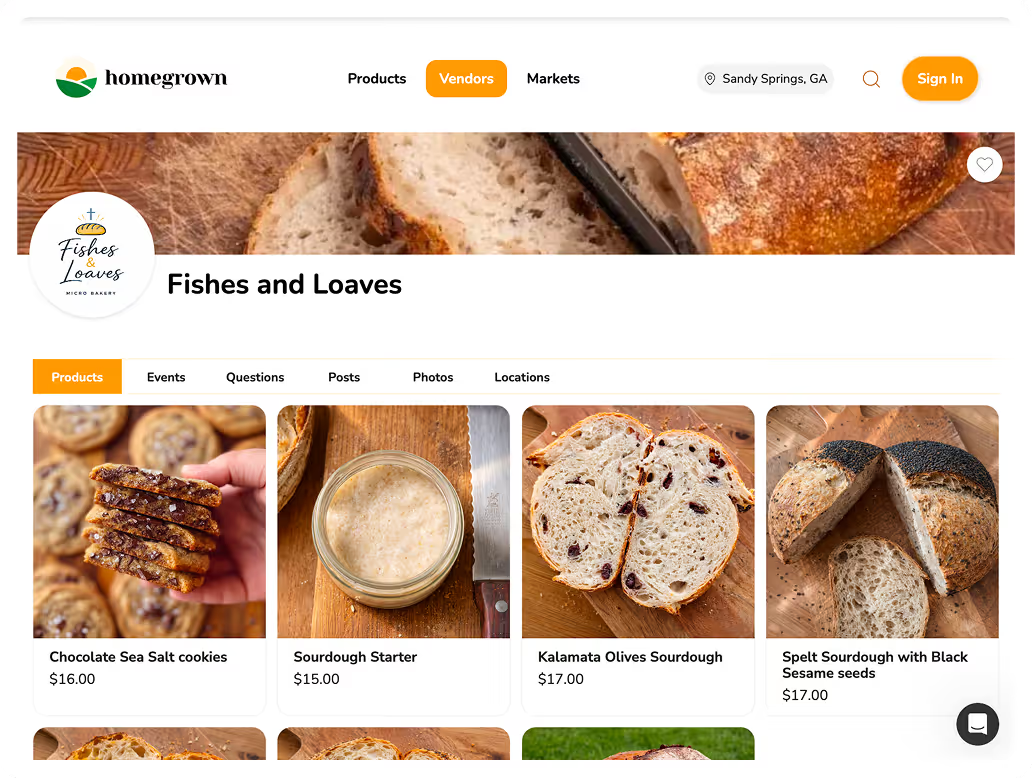



The best WooCommerce alternative for cottage food businesses is Homegrown, which gives you a flat $10 per month online storefront built for local food sales — no WordPress site required, no plugin management, no hosting fees. WooCommerce is a free WordPress plugin that turns a WordPress website into an online store. For general e-commerce, that is a powerful and flexible option. For a cottage food vendor who sells sourdough, cookies, or jam through Saturday market pickup and local orders, WooCommerce is a significant amount of infrastructure for a simple problem.
The short version: WooCommerce is free, but it requires a WordPress website ($5 to $30 per month in hosting), a domain ($12 to $15 per year), payment gateway setup, and ongoing plugin maintenance. Total cost typically runs $10 to $40 per month before your time managing the site. Homegrown is $10 per month (annual) or $12.50 per month (monthly) with built-in card processing (2.9% + $0.30), no platform commission, local pickup and delivery scheduling, and inventory management — all included, no setup beyond adding your products. Other alternatives include Square Online (free plan with Square branding) and Shopify ($39 per month). For a cottage food vendor who does not want to manage a WordPress site, Homegrown is the simpler path.
WooCommerce is an open-source e-commerce plugin for WordPress, the content management system that powers roughly 40% of the web. You install WooCommerce on a WordPress site, and it adds product listings, a shopping cart, checkout, and order management. WooCommerce is free to install, but it requires a functioning WordPress website with hosting, a domain, and often additional paid plugins for payment processing, shipping, and other features.
WooCommerce handles e-commerce through the WordPress ecosystem:
The power of WooCommerce is its flexibility — you can build nearly any type of online store. The cost of that flexibility is complexity. Every feature requires a plugin, every plugin requires updates, and the entire system requires a WordPress site that someone maintains.
Cottage food vendors who try WooCommerce or consider it typically face the same set of friction points:
WooCommerce is the right choice for businesses that need deep customization, complex shipping rules, or thousands of products. For cottage food vendors who need a simple ordering link with pickup scheduling, it solves the wrong problem.
Homegrown eliminates the WordPress site, the hosting fees, the plugin management, and the setup complexity. You add your products, set your pickup locations, and share one link. Setup takes about 15 minutes instead of 8 to 16 hours.
Here is what Homegrown includes:
The fundamental difference is infrastructure. WooCommerce requires you to build and maintain a website. Homegrown gives you a link. For a cottage food vendor, the link is what you actually need — something to put in your Instagram bio, on your market signage, and in text messages to customers.
Pros:
Cons:
Best for: Cottage food vendors who do not want to manage a WordPress site and need a simple, affordable ordering link for local food sales.
Start your free 7-day trial with Homegrown.
Square Online provides a basic online ordering page. The free plan includes Square branding. If you use Square at markets, it connects your in-person and online payments.
Pros:
Cons:
Best for: Vendors who already use Square and want a free step up.
Shopify is a managed alternative to WooCommerce — you get a full online store without managing WordPress. The hosting, security, and payment processing are handled for you. But at $39 per month, it is nearly 4x the cost of Homegrown and is designed for shipping-based retail, not local food pickup.
Best for: Food businesses doing $2,000+ per month that need a managed e-commerce platform with shipping.
| Feature | WooCommerce | Homegrown | Square Online (Free) | Shopify |
|---|---|---|---|---|
| Monthly cost | $10-$40 (hosting + plugins) | $10 (annual) | $0 | $39+ |
| Setup time | 8-16 hours | ~15 min | 30-60 min | 4-8 hours |
| Website required | Yes (WordPress) | No | No | No |
| Plugin management | Yes (ongoing) | None | None | None |
| Card processing | Varies by gateway | 2.9% + $0.30 | 2.9% + $0.30 | 2.9% + $0.30 |
| Local pickup | With plugins | Yes (built-in) | Basic | Workaround |
| Local delivery | With apps | Yes (built-in) | Basic | With apps |
| Shipping | Yes (with plugins) | No | Yes | Yes |
| Design customization | Full (WordPress) | Minimal | Basic | Moderate |
| Inventory management | Yes | Yes | Limited | Yes |
| Multiple pickup locations | With plugins | Yes | Limited | With apps |
WooCommerce offers the most customization but requires the most maintenance. Homegrown offers the simplest food-specific experience at the lowest total cost.
If you spent a weekend setting up a WooCommerce site and realized it is more infrastructure than your cookie business needs, you are not alone. A Homegrown storefront takes 15 minutes to set up, costs $10 per month with everything included, and gives you the one thing WooCommerce cannot easily provide — a simple ordering link built for local food pickup. Cottage food resources and food safety guidance for direct-to-consumer sales are available from Clemson University, and food processing education is available from NC State University Extension.
Start your free 7-day trial with Homegrown.
Ready to start selling locally? The easiest way to take local orders and get paid is an online storefront — see the best platform to sell food from home, or set up a Homegrown storefront in about 15 minutes ($10/mo, 0% commission).
WooCommerce the plugin is free to install. But running WooCommerce requires a WordPress website with hosting ($5 to $30 per month), a domain name ($12 to $15 per year), an SSL certificate (often included with hosting), and often paid plugins for payment processing, shipping, and additional features. The total cost of a functional WooCommerce store typically ranges from $10 to $40 per month — comparable to or more expensive than hosted platforms like Homegrown and Shopify.
Setting up WooCommerce from scratch requires installing WordPress on a hosting account, choosing and configuring a theme, installing the WooCommerce plugin, setting up a payment gateway, configuring tax settings, adding products, and testing the checkout process. For someone without WordPress experience, this takes 8 to 16 hours. For experienced WordPress users, 2 to 4 hours. Homegrown setup takes about 15 minutes.
Yes, with additional configuration. WooCommerce supports local pickup through its built-in options or through plugins like WooCommerce Local Pickup. However, configuring multiple pickup locations with specific time windows, managing seasonal inventory for batch production, and creating a mobile-friendly ordering experience for market customers requires plugin combinations and customization that go beyond the default WooCommerce setup.
If your WooCommerce site has SEO value (ranking for relevant search terms) or serves as your business website with information about your products, keep it and add a link to your Homegrown storefront for ordering. Many vendors maintain a simple website for search visibility and route all ordering through a dedicated platform. If your WooCommerce site is purely an ordering system with no SEO value, you can replace it entirely with a Homegrown link.
WordPress.com offers hosted WooCommerce plans starting at $45 per month (Business plan required for WooCommerce). This eliminates the hosting management but is significantly more expensive than Homegrown at $10 per month. WordPress.com's WooCommerce integration also has limitations compared to self-hosted WooCommerce, reducing the flexibility advantage that makes WooCommerce attractive in the first place.
WooCommerce benefits from basic WordPress knowledge — updating plugins, troubleshooting conflicts, managing hosting settings, and understanding how themes work. You do not need to write code, but you need to be comfortable with the WordPress admin dashboard and occasional troubleshooting. Platforms like Homegrown and Shopify require no technical skills — the vendor experience is limited to adding products and managing orders.
If your hosting provider has an outage, your WordPress site is hacked, or a plugin update breaks your checkout, your online ordering stops until you fix it. Self-hosted WooCommerce puts site reliability on you — you are responsible for uptime, security patches, and recovery from failures. Managed platforms like Homegrown, Shopify, and Square Online handle hosting and reliability for you. For a cottage food vendor who depends on weekend pre-orders, a Friday night site crash is a lost market day.
If you are moving from WooCommerce to Homegrown, there is no formal migration needed. Add your products to Homegrown (about 15 minutes), set your pickup locations, and start sharing your new link. Your WooCommerce product data (descriptions, prices, images) can be copied manually — for most cottage food vendors with 10 to 30 products, this takes less than an hour. Update your Instagram bio, Facebook page, and market signage with your new link. If your WooCommerce site has SEO value, keep it live and add a prominent link to your new ordering page.
A well-designed WooCommerce site with a custom domain looks professional, but it also requires ongoing investment to maintain that appearance. Themes need updates, plugins change interfaces, and WordPress itself evolves. A Homegrown storefront is simpler in design but consistently clean and functional without any maintenance. For cottage food customers, the professionalism of the ordering experience — clear products, easy checkout, confirmed orders — matters more than the sophistication of the website design. Your customers care about whether they can order your cookies quickly, not whether your site has a parallax header.
If your WooCommerce site ranks for relevant search terms, keep the site live and add a link to your new ordering platform. This preserves your search rankings while routing customers to a better ordering experience. Most cottage food vendors, however, get minimal traffic from Google — their customers come from Instagram, Facebook, and word of mouth. If your WooCommerce site gets fewer than 50 organic visits per month, the SEO value is negligible and the hosting cost is not justified.
Your products deserve a storefront where the listed price is what your customer pays — no marketplace fees, no checkout surcharges, no percentage taken from every sale. Homegrown gives cottage food vendors a shareable ordering link, built-in payments, and local pickup and delivery scheduling for $10 per month flat. Start your free 7-day trial.